Getting started
Set your language, appearance, editor, and notifications
Make Campfire look and behave the way you prefer without changing your shevet's shared settings.
At a glance
- 1Choose English or עברית in Language. Campfire changes direction and wording immediately, then saves the preference to your account. If saving fails, it returns to your previous language.
- 2In Appearance, select Light, Dark, or System. System follows your device setting; this choice affects your account view, not anyone else's.
- 3In Editor preferences, choose Standard or Google Docs. This changes the editor layout you see when working—it does not alter the content or layout other collaborators see in their own preference.
- 4In Notifications, toggle only the alert types you want: Peula reminders and review requests, attendance alerts, announcements, and Machsan alerts. Each switch saves its own preference.
- 5Wait for the saved confirmation before leaving after a change. If a setting cannot save, the page restores its previous value so your account does not silently show the wrong preference.
Step-by-step walkthrough
1.Adjust your interface without changing shared work
These settings follow your account. They do not change the underlying Peula or the layout another collaborator sees.
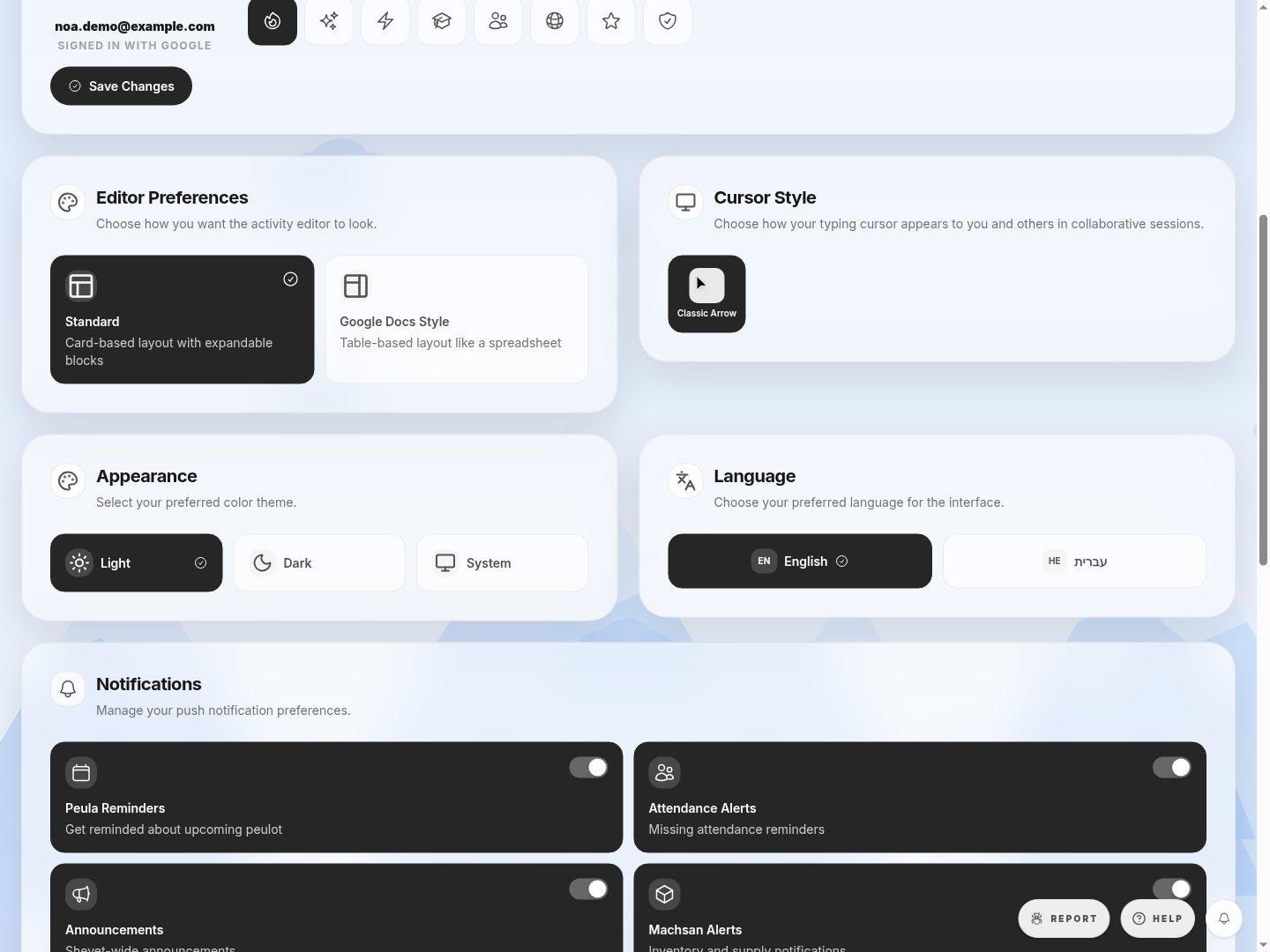
- Editor PreferencesChoose cards or a table-style layout. Both edit the same plan.
- AppearanceSystem follows the device setting; Light and Dark set a fixed theme.
- LanguageEnglish and Hebrew change panel wording and direction.
- NotificationsEach alert type is saved separately.
- 1Open Account Settings and choose your language and theme. Check that the page updates to the intended direction and contrast.
- 2Choose an editor layout, then open a Peula to see how the same content looks in it.
- 3Switch only the notification categories you want. Wait for each change to save; if it reverts, check the error and try again.
Where to look
Language
Account settings grid
Appearance
Account settings grid
Editor preferences
Account settings grid
Notifications
Account settings grid